Almost all ASP errors throw the "500 - Internal Server Error", we
are going to replace this page with a custom asp script that logs information
to a database. I usually create two versions of this file, one for development
and another for production.
The steps below walk you through implementing this feature.
Step 1 - Create your table. I have included a SQL script
to run against SQL Server.
Step 2 - Place the error.asp file on your server. Make sure
you change the connection string information.
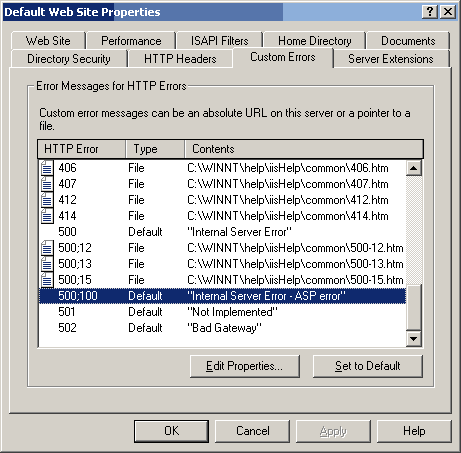
Step 3 - Right-click on the directory or site and select
the properties option. Choose the custom errors tab.
Step 4 - Select the 500:100 HTTP Error and hit edit properties.
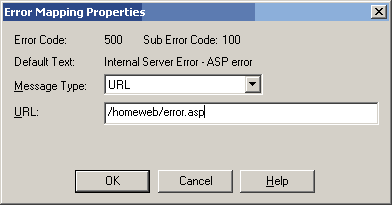
Step 5 - Change the message type to URL and point to error.asp.
Now we'll create the error.asp file:
|
<%@ Language=VBScript %>

	<%Response.Buffer = True%>

	<html>

	<head><title>ASP 3.0 Error Demo</title></head>

	<% 'adovbs.inc, never leave home without it! %>

	<!-- #include file = ./adovbs.inc -->

	<body>

	<%

	 On Error Resume Next

	   'Referencing the error object

	   set objError = Server.getLastError()

	   strNumber = objError.AspCode

	   strSource = objError.Category

	   strPage = objError.File

	   strDesc = objError.Description

	   strCode = Server.HTMLEncode(objError.Source)

	   If strCode = "" then strCode = "No code available"

	   strLine = ObjError.Line

	   strASPDesc = ObjError.ASPDescription


	   'You get the entire context of the page that had the error.

	   'Review the server variables to see if you would want to store
	more information.

	   strRemoteAddr = Request.ServerVariables("REMOTE_ADDR")

	   strRemoteHost = Request.ServerVariables("REMOTE_HOST")

	   strLocalAddr = Request.ServerVariables("LOCAL_ADDR")


	   'Your basic ADO stuff.  This is generic code.  I would
	use a stored procedure to do this on SQL Server.

	   set rs = Server.CreateObject("ADODB.Recordset")

	   set Conn = Server.CreateObject("ADODB.Connection")


	   'SQL Server Connection, make sure you put in your information!

	   conn.ConnectionString = "Provider=SQLOLEDB.1;User id=;Password=;Initial
	Catalog=;Data Source=;"

	   conn.open

	   rs.Open "tblErrorDemo", conn, adOpenDynamic, adLockOptimistic,
	adCmdTable


	   'Adding Record

	   rs.AddNew

	    'The datetime is set on the backend as a default value.

	    rs("er_number") = strNumber

	    rs("er_source") = strSource

	    rs("er_page") = strPage

	    rs("er_desc") = strDesc + ". " + strASPDesc

	    rs("er_code") = strCode

	    rs("er_line") = strLine

	    rs("er_remote_addr") = strRemoteAddr

	    rs("er_remote_host") = strRemotehost

	    rs("er_local_addr") = strLocalAddr

	   rs.Update


	   %>

	   <table width="50%" align="center" cellspacing="0"
	cellpadding="0" border="1">

	    <tr>

	      <td width="200">Error Number:</td><td><%=strNumber%></td></tr>

	    <tr>

	      <td width="200">Source:</td><td><%=strSource%></td></tr>

	    <tr>

	      <td width="200">File:</td><td><%=strPage%></td></tr>

	    <tr valign="top">

	      <td width="200">Description:</td><td><%=strDesc
	+ ". " + strASPDesc%></td></tr>

	    <tr>

	      <td width="200">Code:</td><td><%=strcode%></td></tr>

	    <tr>

	      <td width="200">Line:</td><td><%=strLine%></td></tr>

	     <tr>

	      <td width="200">Remote Address:</td><td><%=strRemoteAddr%></td></tr>

	    <tr>

	      <td width="200">Remote Host:</td><td><%=strRemoteHost%></td></tr>

	    <tr>

	      <td width="200">Local Address:</td><td><%=strLocalAddr%></td></tr>

	   </table>

	   <br>

	   <b>I put a link on each error code giving the development
	staff more information and instruction for each type of error.</b>

	   <br>

	   <br>

	   <table width="100%" align="center" cellspacing="0"
	cellpadding="0" border="1">

	    <tr bgcolor=#ffff00>

	      <td align="center">Error Code</td><td
	align="center">Error Message</td><td align="center">Extended
	Information</td></tr>

	    <tr>

	      <td>ASP 0100</td><td>Out
	of memory</td><td>Unabled to allocate the required memory.</td></tr>

	    <tr>

	      <td>ASP 0101</td><td>Unexpected
	error</td><td>The function return exception_name.</td></tr>

	    <tr>

	      <td>ASP 0102</td><td>Expecting
	string input</td><td>None</td></tr>

	    <tr>

	      <td>ASP 0103</td><td>Expecting
	numeric input</td><td>None</td></tr>

	    <tr>

	      <td>ASP 0104</td><td>Operation
	not allowed</td><td>None</td></tr>

	    <tr>

	      <td>ASP 0105</td><td>Index
	out of range</td><td>An array index is out of range.</td></tr>

	    <tr>

	      <td>ASP 0106</td><td>Type
	Mismatch</td><td>A data type was encountered that cannot be handled.</td></tr>

	    <tr>

	      <td>ASP 0107</td><td>Stack
	Overflow</td><td>The quantity of data being processed is above
	the permitted limit.</td></tr>

	    <tr>

	      <td>ASP 0115</td><td>Unexpected
	Error</td><td>A trapple error occured in an external object.
	The script cannot continue running.</td></tr>

	    <tr>

	      <td>ASP 0177</td><td>Server.CreateObject
	Failed</td><td>Invalid ProgId</td></tr>

	    <tr>

	      <td>ASP 0190</td><td>Unexpected
	error</td><td>A trapple error occurred while releasing an external
	object.</td></tr>

	    <tr>

	      <td>ASP 0191</td><td>Unexpected
	error</td><td>A trapple error occurred in the OnStartPage method
	of an external object.</td></tr>

	    <tr>

	      <td>ASP 0192</td><td>Unexpected
	error</td><td>A trapple error occurred in the OnEndPage method
	of an external object.</td></tr>

	    <tr>

	      <td>ASP 0193</td><td>OnStartPage
	Failed</td><td>An error occurred in the OnStartPage method of
	an external object.</td></tr>

	    <tr>

	      <td>ASP 0194</td><td>OnEndPage</td><td>An
	error occurred in the OnEndPage method of an external object.</td></tr>

	    <tr>

	      <td>ASP 0240</td><td>Script
	Engine Exception</td><td>A script engine threw exception.</td></tr>

	    <tr>

	      <td>ASP 0241</td><td>CreateObject
	Exception</td><td>The CreateObject caused an exception.</td></tr>

	    <tr>

	      <td>ASP 0242</td><td>Query
	OnStartPage Interface Exception</td><td>The querying object OnStartPage
	caused an exception.</td></tr>

	   </table>

	</body>

	</html>

	<%


	   'Kill them their objects

	   set rs = nothing

	   set conn = nothing

	   set objError = nothing

	   Response.Write Err.description

	   Response.End

	%>
|

Comments